
Make it sound like your business.
Voice, personality, and the hard rules it never breaks — everything that makes your AI sound and act like your business, not a generic bot.
Both live in the AI Receptionist hub: the Voice tab controls how your AI sounds, and the Behavior tab controls who it is and what it will never do. Change either any time — nothing reaches a real caller until you say so.
Pick a voice
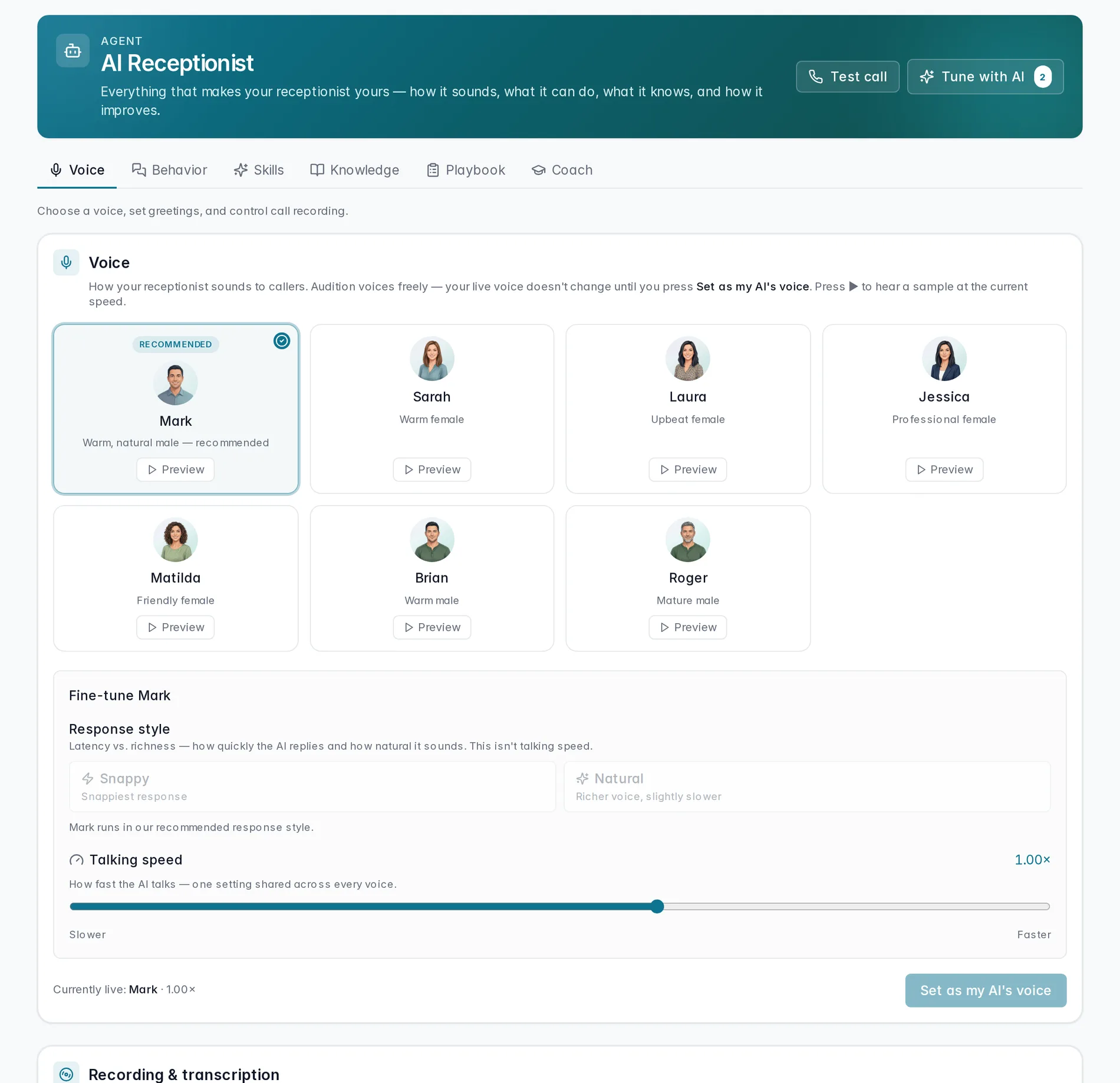
Open AI Receptionist → Voice. Audition as many voices as you like — your live voice doesn't change until you press Set as my AI's voice, so clicking around never affects a call that's actually happening.
- Mark — Warm, natural male. Recommended.
- Sarah — Warm female.
- Laura — Upbeat female.
- Jessica — Professional female.
- Matilda — Friendly female.
- Brian — Warm male.
- Roger — Mature male.
Every voice has a Preview button so you can hear it first. Below the grid, Response style switches between Snappy (the fastest replies) and Natural (a richer voice, slightly slower), and the Talking speed slider slows the AI down or speeds it up, from Slower to Faster.
Set the greeting
Under Voice greeting variants, write a few different opening lines — one per row. A random variant plays at the start of each call, so returning callers don't hear the exact same line every time. Out of ideas? Press Regenerate for a fresh set based on your persona.
Recording & transcription
Turn on Record AI calls to capture the call audio — recording follows the call even through a transfer to a person. The Recording disclosure controls what callers hear about it before the AI greeting: Off, Short ("This call may be recorded for quality and service."), Long (a fuller consent notice), or Custom wording of your own. Transcribe recordings turns the audio into text after the call — it's off by default and is paid usage.
Call-recording laws vary by state — some require every caller to be told the call is recorded (two-party consent). Turning the disclosure off doesn't turn off that legal requirement; you're responsible for complying with the laws where your callers are. See our Terms of Service.
Who your AI is
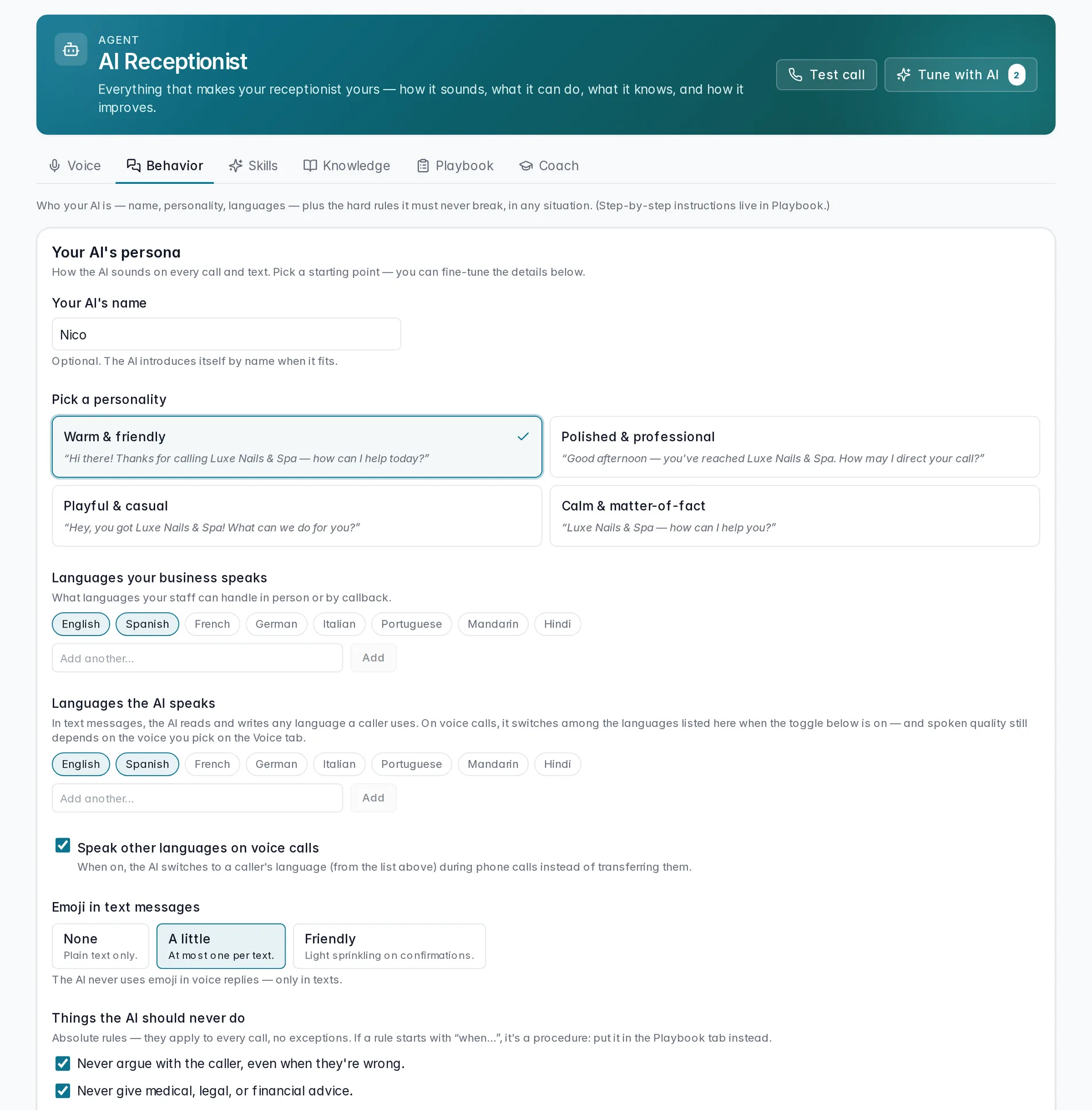
Switch to AI Receptionist → Behavior. Give it a name — optional, try "Nico" — and pick a personality: Warm & friendly, Polished & professional, Playful & casual, or Calm & matter-of-fact. Add the languages it speaks, and set how much emoji it uses in text messages: None, A little, or Friendly. Voice calls never use emoji, no matter what you pick.
The hard rules
Under Things the AI should never do, five rules are on by default:
- "Never argue with the caller, even when they're wrong."
- "Never give medical, legal, or financial advice."
- "Never confirm an appointment, refund, or commitment you can't actually fulfill."
- "Never invent prices, hours, staff, or services you don't have in your knowledge."
- "Never share another caller's information."
Uncheck any that don't apply, and add your own underneath in the free-text box — one rule per line. These are absolute: they apply to every call, no exceptions.
Watch it in action
A quick tour of choosing a voice, tuning the speed, and picking a personality:
Choosing a voice and personality
Audition a voice, set the talking speed, and pick a personality — end to end.
Coming soonOnce your AI sounds right, teach it what to say. See Knowledge for hours, prices, and policies, and Training your agent for the Coach loop that keeps improving it.
Still stuck? We answer fast.